
Privacy on iPhone
Can someone see where a photo was taken?

Often, yes. When your camera has location access, it stores the coordinates inside each photo, and Apple says people you share it with may be able to read them. On iPhone, tap Options on the Share sheet and turn off Location before you send. On Android, Google Photos can leave out locations in shared albums. Landmarks in the picture can still give the place away.
A photo is a picture and a small file of facts about it. One of those facts can be the exact spot where you took it. This guide shows how to check a photo, how to share without the location, and how to stop your camera from saving it. We checked Apple’s Personal Safety User Guide, Google Photos Help and Android Help on 2026-10-09. To clean a photo on any device, our free location remover runs in your browser.
How a photo gets a location
Apple explains it plainly. When the Camera app has access to Location Services, it uses cellular, Wi-Fi, GPS and Bluetooth data to work out where you are. Those coordinates are “embedded into each photo and video”. Apple then says: “When photos and videos that include location metadata are shared, the people you share them with may be able to access the location metadata and learn where it was taken.”
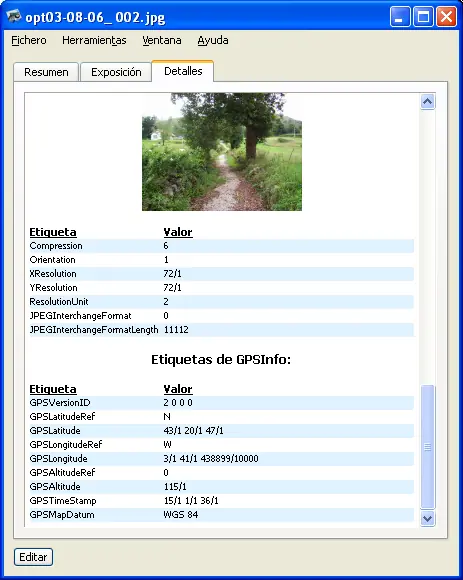
Android works the same way when your camera app has location permission. Google Photos adds a second kind: an estimated location, worked out from landmarks and your other photos.
Check a photo on iPhone
- Open the photo in the Photos app.
- Swipe up, or tap the Info button.
If a map appears, the photo has a location. To find all of them, tap Collections, then the Map collection. Apple says it includes only photos and videos with embedded GPS data.
Share without the location on iPhone
- Select one or more photos in Photos or in the Camera app’s camera roll.
- Tap the Share button, then tap Options.
- Turn off Location. The sheet shows Location Not Included.
- Share as usual.
To remove the location from the photo itself, open it, tap the More button, tap Adjust Info, then Adjust Location, then No Location. On a Mac, select the photos and choose Image, then Location, then Hide Location. Photos for Mac also has an Include location information setting for sharing and export, in Photos, Settings, General.
Stop saving locations on iPhone
Open Settings, tap Privacy & Security, tap Location Services, tap Camera, then tap Never. Apple says location data can be collected only if the Camera app has access to Location Services. Photos you took before keep their location.
On Android and Google Photos
Google’s rules have more parts:
- Camera locations stay. Google says that if your camera added the location, you cannot edit or remove it in Google Photos. You can only change estimated locations and ones you added.
- Shared albums. Each one has a Share photo locations switch. In the album, tap Share, then Options.
- Conversations. New conversations leave locations out by default. Google says conversations started before August 18, 2021 can still show them.
- Partner sharing. Google says “all photos you share will include location details”.
- Outside Google Photos. If you download a photo and email it, Google says the original location your device saved goes with it.
To stop new photos from saving a location, open Settings, tap Location, then App location permissions, and change your camera app to Not allowed. Google notes that menus can differ by phone maker.
The location you cannot strip
Google says it plainly: “Even if you hide your photos’ locations from people, they can guess the location based on landmarks in your photo.” A house number, a school logo or the view from your window can say more than coordinates. For photos that put people at risk, read protest photos and protecting a source’s photos.
What York Vault does
- The York Vault camera saves no location by default. If you turn it on, the location sits only inside the encrypted file. See private camera.
- Sharing strips it. When you share or export from York Vault, it removes GPS, camera details and dates by default. A Keep details switch shows what would go, for the times you want it. See share files safely.
- Originals keep everything, encrypted, so nothing is lost inside your library.
York Vault is on iPhone, iPad and Android. Download York Vault.

Questions people ask
Can someone find my location from a photo I send?
If the photo carries location data, yes. Apple says the Camera app embeds the coordinates where a photo is taken, and that people you share it with may be able to read them and learn where it was taken. Turn off Location in the Share sheet options before you send.
How do I check if a photo has a location on iPhone?
Open the photo in the Photos app and swipe up, or tap the Info button. A map shows if the photo has a location. To see every photo with one, tap Collections, then the Map collection, which Apple says includes only photos with embedded GPS data.
How do I stop my iPhone camera saving my location?
Open Settings, tap Privacy & Security, tap Location Services, tap Camera, then tap Never. Apple says location data can be collected only if the Camera app has access to Location Services. Photos you already took keep their location until you remove it.
Can I remove the location from a photo on Android?
In Google Photos, only if Google estimated it or you added it yourself. Google says that if your camera added the location, you cannot edit or remove it in Google Photos. To stop new photos from saving it, open Settings, Location, App location permissions, and change your camera app's access.
Does Google Photos share the location when I share a photo?
It depends. Google says each shared album has a Share photo locations switch, new conversations leave locations out by default, and partner sharing always includes them. A photo you download and email keeps the location your camera saved, without any edits you made in Google Photos.
Sources
- Manage location metadata in Photos (Apple Personal Safety User Guide) · checked Oct 9, 2026
- Understand, find and edit your photos' locations (Google Photos Help, Android) · checked Oct 9, 2026
- Manage location permissions for apps (Android Help) · checked Oct 9, 2026
- Photos settings on Mac (Photos User Guide) · checked Oct 9, 2026


